What Is Yet Another Config (YACL)?
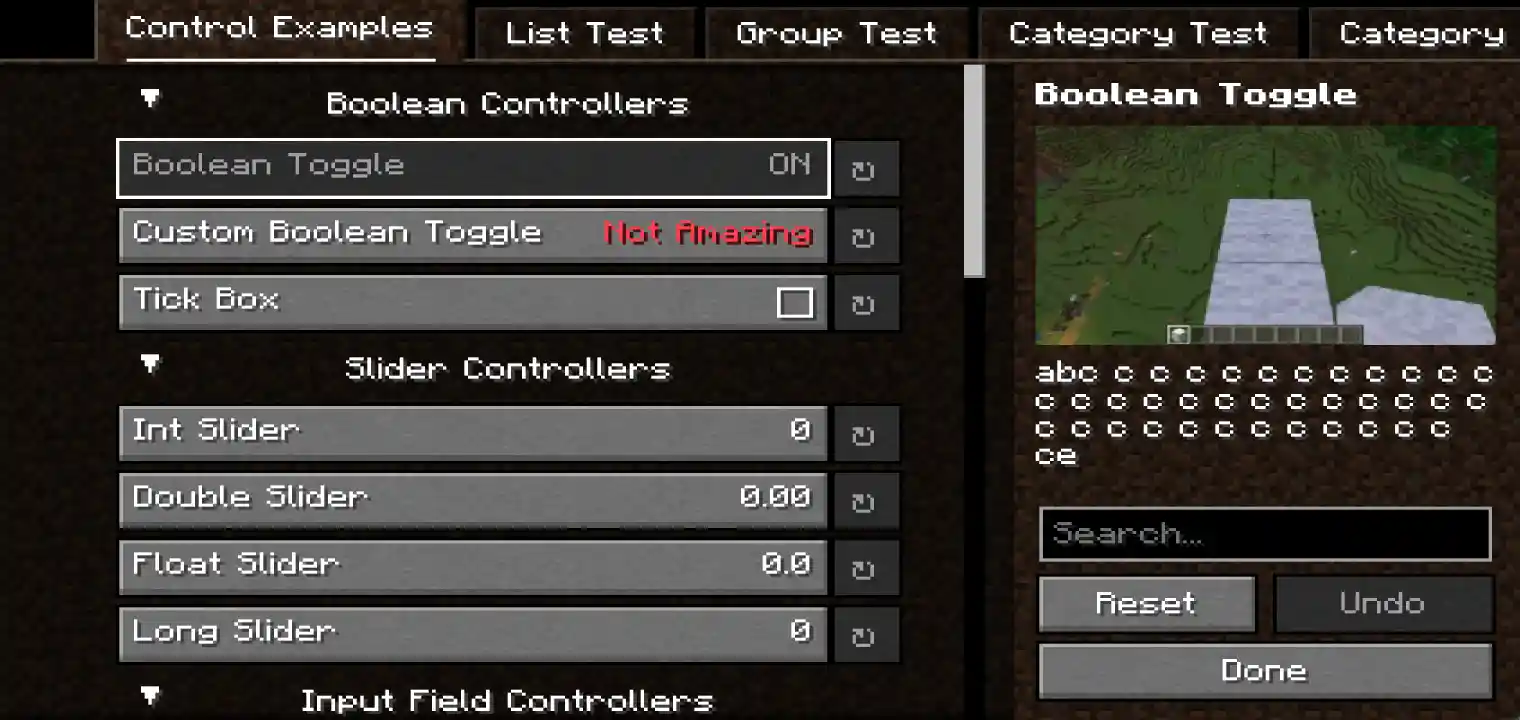
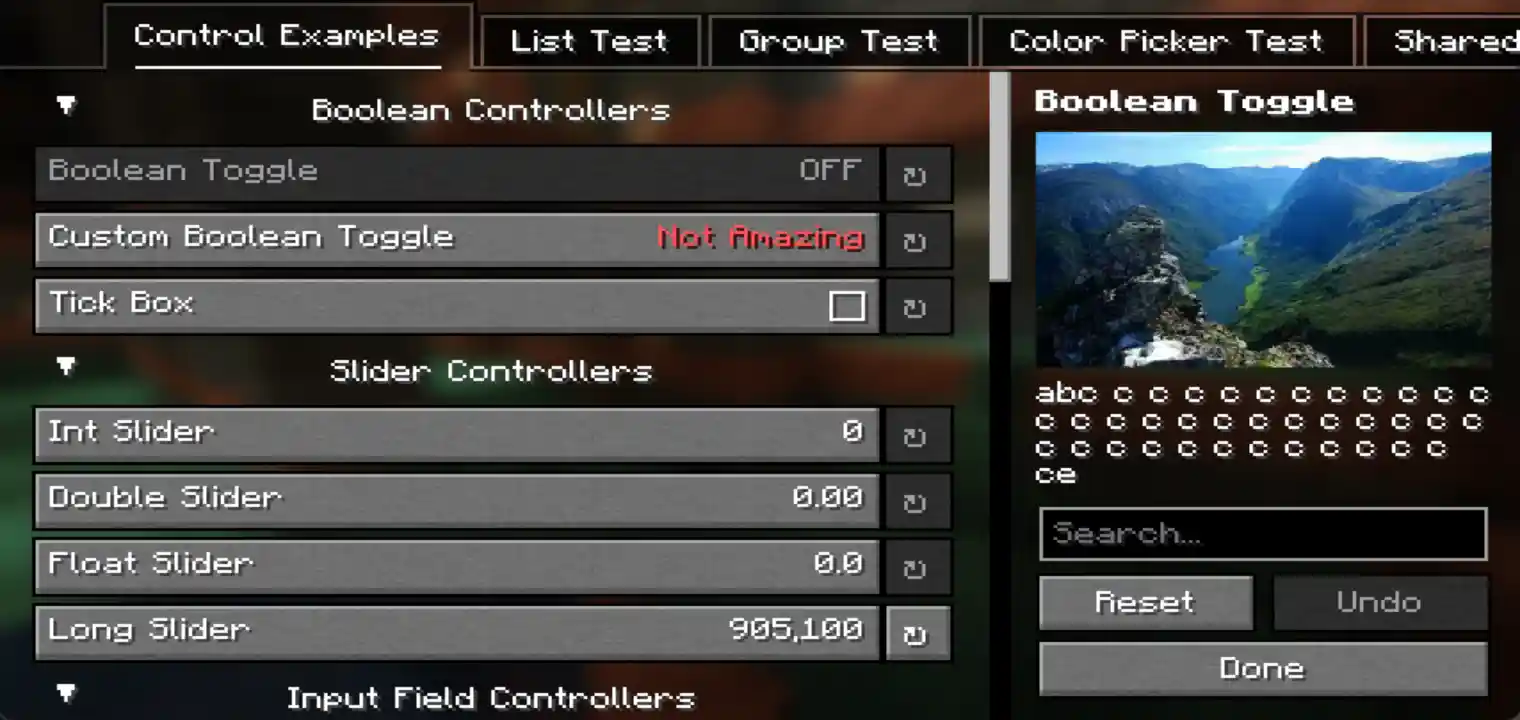
Yet Another Config, commonly known as YACL, is a Minecraft configuration library that allows mods to create interactive configuration screens.
It provides a framework for displaying mod settings in a structured and user-friendly interface.
Instead of requiring players to manually open configuration files and edit values, YACL allows settings to be managed through Minecraft menus.
A mod using YACL can provide options such as:
- Toggle buttons
- Sliders
- Selection menus
- Text fields
- Grouped settings
- Advanced configuration sections
The goal of YACL is to make configuration easier for both mod developers and players.
Why Do Minecraft Mods Need Configuration Libraries?
Minecraft mods can contain many customizable features.
For example, a mod may allow users to change:
- Display options
- Gameplay behavior
- Controls
- Performance settings
- Feature availability
Without a configuration system, players may need to manually edit files.
This creates several problems:
- Difficult setup process
- Confusing configuration files
- Higher chance of mistakes
- Poor user experience
A configuration library solves this by providing a consistent interface.
The Role Of YACL In Minecraft Modding
YACL acts as a bridge between a Minecraft mod and its configuration options.
A developer can use YACL to create a configuration screen where players can easily modify available settings.
Instead of creating a complete menu system from the beginning, developers can use YACL's existing framework.
This provides:
- Faster development
- Better organization
- Consistent menus
- Easier user interaction
How Does Yet Another Config Work?
YACL works by allowing Minecraft mods to define their available settings and display them through a configuration interface.
The general process is:
- A mod creates configurable options
- YACL organizes those options
- Minecraft displays them in a menu
- The player changes settings
- The mod applies those changes
The player does not need to understand the internal configuration system.
They simply interact with a clean menu.
YACL Configuration Screens Explained
One of the main reasons players use YACL-based mods is the improved configuration experience.
A YACL configuration screen can organize settings into different sections.
Examples include:
- General settings
- Performance settings
- Visual options
- Advanced controls
This makes large configuration systems easier to navigate.
Types Of Settings Supported Through YACL
YACL allows mods to present different types of options.
Boolean Settings
Boolean settings usually represent two choices:
Examples:
- Turn feature on/off
- Enable an option
- Disable an effect
These are commonly displayed as switches or checkboxes.
Numeric Settings
Numeric options allow players to adjust values.
Examples:
- Distance settings
- Amount controls
- Speed values
These may appear as sliders.
Selection Options
Some settings require choosing from multiple options.
Examples:
- Different modes
- Display choices
- Behavior options
YACL can present these choices through selection menus.
Text-Based Settings
Some mods allow users to enter text values.
Examples:
- Names
- Labels
- Custom messages
YACL can provide interfaces for managing these inputs.
Grouped Configuration Options
Large mods may contain many settings.
YACL helps organize them into groups.
For example:
- General
- Basic mod behavior.
- Visual
- Appearance-related options.
- Advanced
- More technical settings.
This organization improves usability.
Why Players Use Yet Another Config
Players benefit from YACL because it makes mod customization easier.
Instead of searching through files, they can adjust settings directly inside Minecraft.
Benefits include:
Easier Configuration Management
Players can modify settings without manually editing files.
Better Understanding Of Options
Menus can include descriptions explaining what settings do.
Faster Customization
Players can quickly change settings while testing different gameplay experiences.
Improved User Experience
A clean interface makes complex mods easier to use.
Why Mod Developers Use YACL
YACL is not only useful for players.
Mod developers use it because creating configuration interfaces manually can require additional work.
YACL provides ready-made systems that help developers build configuration menus more efficiently.
Benefits For Developers
Developers can benefit from:
- Faster configuration screen creation
- Organized settings
- Consistent interface design
- Easier maintenance
YACL And Fabric Minecraft Mods
YACL is commonly used within the Fabric Minecraft ecosystem.
Many Fabric mods use external libraries to provide additional functionality.
YACL can become one of those required libraries when a mod depends on its configuration system.
Players installing a YACL-based mod may need to install YACL separately.
YACL Installation Overview
Installing YACL usually follows the same basic process as installing other Minecraft mod libraries.
Before installation, users should have:
- Minecraft Java Edition
- Compatible mod loader
- Correct YACL version
- Mods that require YACL
Basic installation steps:
Step 1: Check Requirements
Before downloading YACL, check:
- Minecraft version
- Mod loader compatibility
- Required version
Step 2: Download The Correct YACL File
Choose the version that matches your Minecraft setup.
Using an incorrect version may cause errors.
Step 3: Open Minecraft Mods Folder
Locate your Minecraft directory and open the mods folder.
Step 4: Add YACL File
Place the downloaded YACL file inside the mods folder.
Do not extract the file unless required.
Step 5: Launch Minecraft
Start Minecraft with the correct mod loader profile.
If the required dependencies are installed correctly, YACL will load with compatible mods.
How To Use YACL With Minecraft Mods
After installation, players usually interact with YACL through supported mod menus.
The process is simple:
- Open the mod configuration menu
- Select available settings
- Adjust options
- Save changes
The exact menu location depends on the mod using YACL.
YACL Configuration Management
Good configuration management helps maintain a stable Minecraft setup.
Players should:
- Change settings carefully
- Understand options before modifying them
- Keep backups before major changes
Large mod collections may contain many configuration systems, so organization becomes important.
YACL Compatibility Overview
YACL compatibility depends on:
- Minecraft version
- Mod loader
- Required mod versions
Before installing YACL, check that it matches the mod requiring it.
Using incompatible versions may result in:
- Missing dependency errors
- Failed launches
- Configuration problems
YACL Configuration Experience For Minecraft Players
One of the biggest advantages of Yet Another Config is the improved experience it provides when managing Minecraft mod settings.
Many Minecraft mods offer dozens or even hundreds of configuration options. Without a proper interface, managing these options can become confusing.
YACL helps transform complex configuration systems into organized menus that players can understand more easily.
Instead of searching through files, players can usually access settings through a graphical interface where options are grouped logically.
This creates a smoother workflow:
- Open the configuration menu
- Understand available options
- Adjust settings
- Save changes
- Continue playing
How YACL Improves Mod Configuration Usability
A good configuration system is not only about changing values.
It is also about helping users understand what each option does.
YACL-based configuration screens can improve usability through:
- Organized categories
- Clear option names
- Descriptions
- Visual controls
- Better navigation
This is especially useful for larger mods where configuration files may become difficult to manage.
YACL Categories And Configuration Organization
Large Minecraft mods often divide settings into different categories.
YACL supports this organized approach.
Examples of categories include:
General Configuration
These options control the basic behavior of a mod.
Examples:
- Enable or disable features
- Basic gameplay changes
- Default behavior settings
Visual Configuration
These settings control appearance-related features.
Examples:
- Interface changes
- Display options
- Visual effects
Performance Configuration
Some mods include settings that affect resource usage.
Examples:
- Processing options
- Feature limitations
- Optimization controls
Advanced Configuration
Advanced options are usually designed for experienced users.
These settings may affect:
- Technical behavior
- Internal features
- Detailed customization
YACL And In-Game Configuration Menus
A major benefit of YACL is allowing players to configure mods without leaving Minecraft.
Traditional configuration methods often require:
- Closing Minecraft
- Opening files manually
- Editing values
- Saving changes
- Restarting the game
YACL-based menus can simplify this process by bringing configuration options directly into the game interface.
Why In-Game Configuration Matters
In-game configuration provides several advantages:
Faster Adjustments
Players can quickly change settings while testing a mod.
Fewer Configuration Mistakes
Visual menus reduce the chance of entering incorrect values.
Better Accessibility
Players who are not familiar with editing files can still customize mods.
YACL Settings Validation And User Safety
Configuration systems need to handle user input correctly.
YACL helps developers create controlled settings where values can be managed more safely.
For example, a setting requiring a specific range can prevent users from entering unsuitable values.
This helps reduce:
- Configuration errors
- Unexpected behavior
- Invalid settings
YACL Role In Mod Quality
A well-designed configuration system can improve the overall quality of a Minecraft mod.
Players often judge mods not only by features but also by usability.
A mod with a clear configuration system can provide:
- Better customization
- Easier learning process
- More professional user experience
YACL helps developers create that smoother interaction.
YACL And Minecraft Modpack Experience
Modpacks often combine many different mods into one Minecraft setup.
As the number of mods increases, configuration management becomes more important.
A modpack may include:
- Gameplay mods
- Performance mods
- Utility mods
- Visual mods
Each mod may have different settings.
YACL helps supported mods provide a consistent configuration experience.
Managing YACL-Based Mods In Modpacks
When using many mods, players should:
Understand Required Dependencies
Some mods require YACL to display their configuration menus.
Keep Versions Compatible
Always match:
- Minecraft version
- Mod loader version
- YACL version
- Mod versions
Avoid Random Configuration Changes
Large modpacks can have complex interactions.
Change settings carefully and test results.
YACL For Beginners
New Minecraft mod users may find configuration systems confusing at first.
YACL makes the learning process easier by providing visual settings instead of requiring manual file editing.
A beginner workflow:
- Install a YACL-supported mod
- Open the configuration menu
- Read available options
- Adjust simple settings first
- Learn advanced options gradually
YACL For Advanced Minecraft Users
Experienced players often use configuration systems to fine-tune their gameplay.
Advanced users may adjust:
- Performance-related settings
- Detailed feature behavior
- Mod interactions
YACL provides a structured interface that makes managing these options easier.
YACL And Mod Compatibility Management
Compatibility is an important part of any Minecraft mod setup.
YACL compatibility depends on whether:
- The mod requires YACL
- The installed version matches Minecraft
- Required dependencies are available
Before installing a YACL-based mod, players should check requirements carefully.
Common YACL Compatibility Situations
Missing YACL Dependency
A mod may fail to load if it requires YACL but the library is missing.
Solution:
- Install the required YACL version
- Restart Minecraft
- Check compatibility
Wrong YACL Version
Using an incompatible version may cause:
- Launch errors
- Configuration menu problems
- Mod loading failures
Mod Loader Compatibility
Players should confirm whether the mod uses:
- Fabric
- Another compatible environment
The mod loader must match the requirements.
YACL And Minecraft Version Updates
Minecraft updates can affect mod compatibility.
When moving to a newer Minecraft version:
Check:
- YACL support
- Mod updates
- Required dependencies
Avoid updating only one component without checking the complete setup.
Maintaining A Stable YACL Setup
A stable setup requires good management practices.
Recommended practices:
Keep Backup Configurations
Before changing many settings, keep copies of working configurations.
Update Carefully
Check compatibility before updating mods or libraries.
Remove Unused Mods
Unused mods can create unnecessary complexity.
Test Changes Gradually
Change one major setting at a time.
This makes troubleshooting easier.
YACL Benefits Summary
Yet Another Config provides value for both players and developers.
For players:
- Easier mod customization
- Better configuration menus
- Less manual editing
- Improved usability
For developers:
- Faster configuration development
- Organized settings systems
- Better user experience
Why YACL Is Important In Modern Minecraft Modding
Modern Minecraft mods are becoming more advanced.
As mods add more features, they require better ways to manage customization.
Configuration libraries like YACL help solve this challenge by providing structured and accessible settings systems.
They allow developers to focus on creating features while giving players better control over their experience.
Yet Another Config Features Explained
Yet Another Config provides several features that improve how Minecraft mods handle configuration systems.
The main purpose of these features is to create a better connection between:
- Mod settings
- Player interaction
- Configuration management
Instead of presenting users with complicated configuration files, YACL allows settings to be displayed through structured and interactive menus.
Custom Configuration Screens
One of the main features of YACL is the ability to create custom configuration screens.
These screens allow players to manage mod settings directly through Minecraft.
A good configuration screen can include:
- Organized categories
- Different setting types
- Descriptions
- Controls for changing values
- Navigation options
This creates a more accessible experience compared with manually editing files.
Organized Settings Layout
When mods contain many options, organization becomes important.
YACL helps developers arrange settings into logical groups.
For example:
Gameplay Settings
Options related to how the mod changes Minecraft mechanics.
Visual Settings
Options related to appearance and display.
Performance Settings
Options related to resource usage and optimization.
Advanced Settings
Options intended for experienced users.
This structure allows players to find important options more quickly.
Different Control Types
YACL supports different ways for users to interact with settings.
Depending on the mod, players may see:
- Switches
- Sliders
- Dropdown menus
- Text inputs
- Buttons
The correct control type makes each setting easier to manage.
Slider-Based Settings
Sliders are useful for values that have a range.
Examples:
- Distance values
- Amount controls
- Intensity settings
Instead of manually entering numbers, players can adjust values visually.
Toggle-Based Settings
Toggle options are commonly used for features that can be enabled or disabled.
Examples:
- Enable feature
- Disable effect
- Activate option
These settings are simple and easy to understand.
Selection-Based Settings
Some configurations require choosing one option from several available choices.
Examples:
- Different modes
- Behavior types
- Display styles
Selection controls make these choices easier to manage.
Text Input Configuration
Some mods require custom text values.
Examples:
- Custom names
- Messages
- Labels
YACL can provide interfaces for managing these inputs.
Configuration Persistence
A useful configuration system needs to remember player choices.
YACL-based mods generally save configuration changes so users do not need to repeat adjustments every time Minecraft starts.
This helps maintain:
- Personal preferences
- Gameplay settings
- Mod customization
YACL And Better User Experience
A configuration library is not only about technical functionality.
It also affects how players experience a mod.
A well-designed configuration system provides:
- Easier learning
- Faster customization
- Better control
- Less confusion
YACL helps improve the interaction between players and Minecraft mods.
YACL For Mod Developers
While players benefit from better menus, developers use YACL to simplify the process of creating configuration systems.
Creating a complete configuration interface from scratch requires time and maintenance.
YACL provides a structured framework that developers can use instead.
Why Developers Choose YACL
Developers may choose YACL because it helps with:
Faster Development
Creating configuration screens becomes easier compared with building every component manually.
Consistent Interface
Players get a familiar configuration experience across different mods.
Easier Maintenance
Organized configuration systems are easier to update when mods receive new features.
YACL Development Workflow
A typical developer workflow involves:
- Creating configurable options
- Defining settings structure
- Connecting settings with YACL
- Creating the configuration screen
- Testing user interaction
This allows developers to provide players with accessible settings.
YACL And Mod Customization
Modern Minecraft mods often include many customization options.
Players want control over:
- How features behave
- What appears in the game
- How systems interact
YACL helps provide that control through a better interface.
YACL Configuration Compared With Manual Editing
Before graphical configuration menus became common, players often edited files manually.
Manual editing has disadvantages:
- Requires technical knowledge
- Easy to make mistakes
- Harder to understand options
- Slower for frequent changes
YACL-based menus simplify this process.
Manual Configuration vs YACL Configuration
Manual File Editing
Requires:
- Opening files
- Understanding values
- Changing text manually
YACL Configuration Menu
Allows:
- Visual controls
- Organized settings
- Easier adjustments
YACL And Large Minecraft Mods
Large mods often contain many configurable features.
Without proper organization, users may struggle to manage settings.
YACL helps large mods present options in a clearer way.
This becomes especially valuable in:
- Large modpacks
- Technical setups
- Custom gameplay environments
YACL In Modded Minecraft Ecosystem
Configuration libraries are becoming increasingly important because Minecraft mods are becoming more advanced.
As mods add:
- More features
- More customization
- More technical systems
Players need better ways to control them.
YACL contributes by improving configuration accessibility.
Best Practices When Using YACL-Based Mods
Players can maintain a better experience by following good practices.
Read Settings Before Changing Them
Understand what an option does before modifying it.
Change Important Options Gradually
Avoid changing many settings at the same time.
Keep Working Configurations
If you create a setup that works well, keep a backup.
Check Compatibility After Updates
A mod update may introduce new settings or change existing behavior.
YACL Common Usage Mistakes
Even with a user-friendly system, some mistakes can create problems.
Installing Only YACL Without Required Mods
YACL is usually a dependency used by other mods.
Installing it alone does not add gameplay features.
Using Incorrect Versions
Always match:
- Minecraft version
- Mod version
- YACL version
Changing Advanced Settings Without Understanding Them
Advanced options may affect how a mod behaves.
Change them carefully.
Ignoring Mod Documentation
Some settings have specific purposes explained by the mod developer.
Reading documentation helps avoid problems.
Practical Uses Of Yet Another Config (YACL)
Yet Another Config is mainly used to improve how Minecraft mods handle customization.
While the library itself does not add gameplay features, it improves the way players interact with mods that contain configurable options.
A YACL-supported mod can provide players with easier control over:
- Feature behavior
- Visual preferences
- Gameplay options
- Performance adjustments
- Advanced settings
This makes YACL especially useful in modern Minecraft modding environments where customization has become a major part of the experience.
Using YACL With Utility Mods
Many utility-focused Minecraft mods contain multiple options that players may want to adjust.
Examples include mods that provide:
- Interface improvements
- Gameplay assistance
- Quality-of-life features
- Additional controls
Without a configuration menu, managing these options can become complicated.
YACL allows these mods to present settings in a cleaner way.
Using YACL With Visual Mods
Visual customization mods often require many adjustable options.
Examples include:
- Display changes
- Visual effects
- Interface modifications
YACL makes these settings easier to manage by presenting them through organized menus.
Players can adjust visual preferences without searching through technical files.
Using YACL In Technical Minecraft Setups
Technical players often use complex mod collections with many configurable systems.
In these setups, configuration management becomes extremely important.
YACL helps by making it easier to:
- Find settings
- Understand options
- Adjust values
- Maintain preferred configurations
YACL And Minecraft Modpack Management
Modpacks combine multiple Minecraft mods into a single experience.
As the number of mods increases, configuration management becomes more challenging.
A large modpack may contain:
- Gameplay modifications
- Automation systems
- Performance improvements
- Visual enhancements
- Utility features
Each mod may provide different settings.
YACL-supported mods create a more consistent experience by providing organized configuration screens.
Managing Configurations In Large Modpacks
When using many YACL-based mods:
Keep Track Of Important Settings
Remember which settings affect:
- Gameplay
- Performance
- Visual features
Avoid Changing Everything At Once
Large modpacks contain many interconnected systems.
Change settings gradually and test the results.
Maintain Stable Configurations
When a setup works correctly, keep a backup before making major changes.
YACL And Player Customization
Minecraft players have different preferences.
Some players prefer:
- More visual features
- Higher performance
- More automation
- Different gameplay mechanics
YACL helps mods provide customization options that allow players to create their preferred experience.
Why Customization Matters In Minecraft Mods
Minecraft is a sandbox game where players enjoy creating unique experiences.
Mods expand this idea by allowing users to modify many aspects of gameplay.
Configuration systems are important because they allow players to decide:
- Which features are active
- How features behave
- What level of customization they want
YACL supports this customization process.
YACL And Mod Updates
When a mod receives updates, configuration options may change.
New versions may introduce:
- New settings
- Updated categories
- Changed option behavior
Players should review configuration changes after major updates.
Managing YACL Settings After Updates
After updating a YACL-supported mod:
- Launch Minecraft
- Open the configuration menu
- Review new options
- Confirm important settings
This helps maintain the desired gameplay experience.
YACL Compatibility With Other Libraries
Minecraft mods often rely on multiple libraries.
A mod may require:
- YACL
- Fabric API
- Other supporting libraries
These dependencies work together to provide complete functionality.
Before installation, players should always check the complete dependency list.
YACL Dependency Management
Dependency management is important because missing files can prevent mods from loading.
Common dependency issues include:
- Missing YACL
- Wrong version
- Missing additional libraries
The solution is usually checking the mod requirements and installing compatible versions.
YACL And Minecraft Version Changes
Minecraft updates can change internal systems.
When moving between Minecraft versions, players should check:
- YACL availability
- Mod updates
- Dependency compatibility
A configuration library version designed for one Minecraft release may not work with another.
Maintaining A Clean YACL Environment
A clean mod environment makes troubleshooting easier.
Good practices include:
- Removing unused mods
- Keeping versions organized
- Avoiding duplicate files
- Maintaining backups
A well-managed setup reduces unnecessary problems.
YACL Common Problems Overview
Although YACL improves configuration management, users may still experience issues.
Common problems include:
- Configuration screen not appearing
- Missing dependency errors
- Version conflicts
- Mod loading failures
YACL Configuration Menu Not Appearing
Possible reasons:
- The installed mod does not support YACL
- Required dependency is missing
- Wrong version installed
Solution:
Check the mod requirements and confirm compatibility.
YACL Missing Dependency Error
This usually means a mod requires YACL but Minecraft cannot find it.
Solution:
- Install the required YACL version
- Place it correctly
- Restart Minecraft
YACL Version Conflict
Using incompatible versions may create problems.
Always match:
- Minecraft version
- Mod version
- YACL version
YACL And Mod Loader Compatibility
Before installing YACL, confirm that the mod environment supports it.
A mismatch between mod loader and mod requirements can prevent successful loading.
YACL Best Practices Summary
For the best experience:
- Use compatible versions
- Install required dependencies
- Keep configurations organized
- Change settings carefully
- Maintain backups
- Review updates properly
Why Yet Another Config Is Valuable
YACL solves an important challenge in Minecraft modding: making complex configurations easier to manage.
For players, it provides:
- Better menus
- Easier customization
- Less manual editing
For developers, it provides:
- A structured configuration framework
- Faster development
- Better user interaction